
![youtube - [Video]](/web/image/product.image/166/image_128/youtube%20-%20%5BVideo%5D?unique=4edc7bb)
Bank Statement Import TDL for Tally Prime | PDF & Image Import | ₹0.40/Page | 3,000 Pages @ ₹1,000 | Unlimited ₹4,000/Year
💳 Recharge Your Account
To recharge your page balance or purchase a subscription plan, please visit our Pricing page.
👉 Recharge Now – Pricing Plans
Choose the plan that best fits your needs:
- 🟢 Pay As You Go – ₹0.40 per processed page
- 🔵 Value Pack – ₹1,000 for 3,000 pages
- ⭐ Unlimited Plan – ₹4,000/year (Unlimited Pages)
🚀 Bank Statement Import TDL for Tally Prime
Complete Feature List
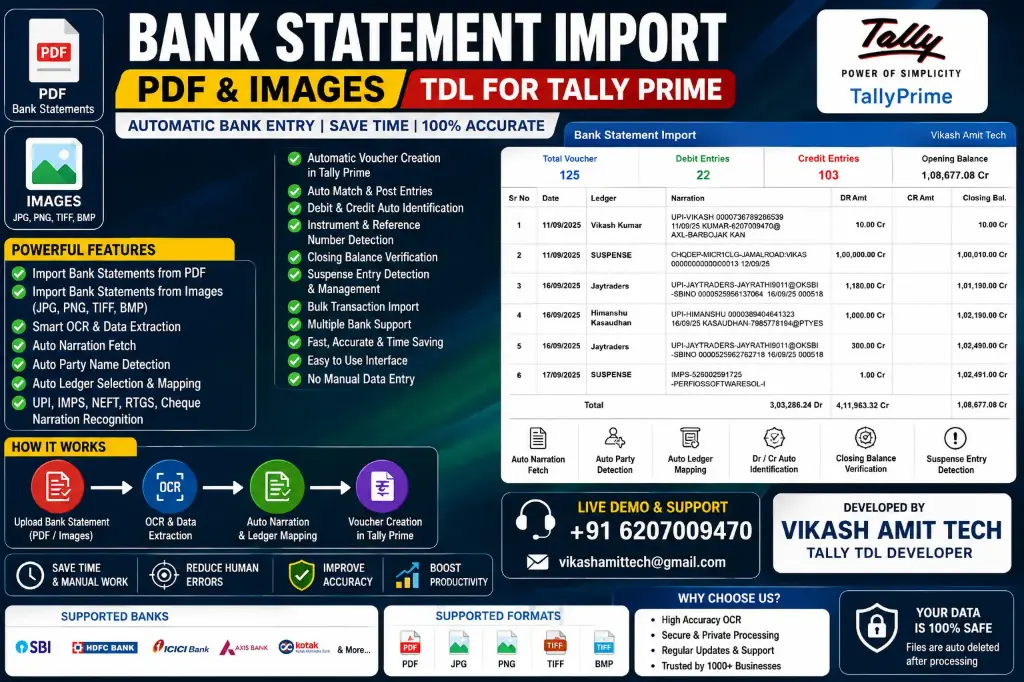
Our Bank Statement Import TDL is a powerful automation solution that imports PDF & Image Bank Statements directly into Tally Prime with intelligent OCR, automatic narration analysis, and voucher creation.
📂 Bank Statement Import
- ✅ Import Bank Statements from PDF
- ✅ Import Bank Statements from Images (JPG, PNG, TIFF, BMP, WEBP)
- ✅ Supports Digital PDF
- ✅ Supports Scanned PDF
- ✅ Multi-page PDF Support
- ✅ Bulk Bank Statement Import
🤖 Smart OCR & Data Extraction
- ✅ AI-Powered OCR Technology
- ✅ Intelligent Data Extraction
- ✅ High Accuracy Recognition
- ✅ Automatic Data Validation
- ✅ Fast Processing Engine
📝 Intelligent Narration Recognition
- ✅ Auto Narration Fetch
- ✅ Auto Party Name Detection
- ✅ UPI Narration Recognition
📑 Automatic Voucher Creation
- ✅ Automatic Voucher Creation
- ✅ Receipt Voucher Creation
- ✅ Payment Voucher Creation
🏦 Bank Details Detection
- ✅ Transaction Date Detection
- ✅ Transaction Amount Detection
- ✅ Debit Amount Recognition
- ✅ Credit Amount Recognition
- ✅ Closing Balance Detection
- ✅ Opening Balance Detection
- ✅ Running Balance Verification
- ✅ Instrument Number Detection
- ✅ Instrument Date Detection
- ✅ Cheque Number Detection
- ✅ Reference Number Detection
- ✅ Transaction ID Detection
- ✅ UTR Number Detection
- ✅ UPI Transaction ID Detection
🔍 Verification & Accuracy
- ✅ Closing Balance Verification
- ✅ Duplicate Entry Detection
- ✅ Missing Transaction Detection
- ✅ Suspense Entry Detection
- ✅ Data Validation
- ✅ High Accuracy Import
⚡ Performance
- ✅ Fast Processing
- ✅ Bulk Transaction Import
- ✅ Thousands of Entries Supported
- ✅ Low Memory Usage
- ✅ Optimized Import Engine
🏦 Multiple Bank Support
Supports statements from major Indian banks including:
- ✅ SBI
- ✅ HDFC Bank
- ✅ ICICI Bank
- ✅ Axis Bank
- ✅ Kotak Mahindra Bank
- ✅ Punjab National Bank
- ✅ Bank of Baroda
- ✅ Canara Bank
- ✅ Union Bank of India
- ✅ Indian Bank
- ✅ Bank of India
- ✅ IndusInd Bank
- ✅ IDFC FIRST Bank
- ✅ AU Small Finance Bank
- ✅ Yes Bank
- ✅ Federal Bank
- ✅ UCO Bank
- ✅ Central Bank of India
- ✅ Indian Overseas Bank
- ✅ And many more...
📄 Supported File Formats
- ✅ JPG
- ✅ JPEG
- ✅ PNG
- ✅ TIFF
- ✅ BMP
- ✅ WEBP
🔐 Security
- ✅ Secure Processing
- ✅ Privacy Protected
- ✅ Safe Data Handling
- ✅ Reliable Import Engine
💼 Ideal For
- Chartered Accountants (CA)
- Tax Consultants
- Accountants
- Bookkeepers
- Businesses
- Tally Partners
- ERP Developers
- Financial Consultants
- Audit Firms
🎯 Why Choose Our TDL?
- ⭐ No Manual Data Entry
- ⭐ Save Hours of Accounting Work
- ⭐ Increase Productivity
- ⭐ Reduce Human Errors
- ⭐ Improve Accounting Accuracy
- ⭐ Easy to Use
- ⭐ Instant Download
- ⭐ Regular Updates
- ⭐ Premium Support
- ⭐ Fully Compatible with Tally Prime
💰 Pricing Plans
🟢 Pay As You Go
₹0.40 Per Processed Page
🔵 Value Pack
₹1,000 – 3,000 Pages
⭐ Professional Unlimited
₹4,000 / Year – Unlimited Pages
- How to Install the TDL File in Tally
- Step 1. Go to Gateway of Tally.
- Step 2. Then Press Ctrl+Alt+T button
- Step 3. Now Press F4 Button or Click on “Manage Local TDL” button
- Step 4. Now do “Yes” to “Load TDL Files on Startup” option
- Step 5. Now in the next line “List of TDL Files to preload on Startup” Enter the TDL File Path or Location Like “E:/File.tcp”
- Step 6. Now save the settings
- Your TDL File is ready to use.
- Tally Prime TDL
Your Dynamic Snippet will be displayed here...
This message is displayed because youy did not provide both a filter and a template to use.