
![youtube - [Video]](/web/image/product.image/173/image_128/youtube%20-%20%5BVideo%5D?unique=eff7151)
- How to Install the TDL File in Tally
- Step 1. Go to Gateway of Tally.
- Step 2. Then Press Ctrl+Alt+T button
- Step 3. Now Press F4 Button or Click on “Manage Local TDL” button
- Step 4. Now do “Yes” to “Load TDL Files on Startup” option
- Step 5. Now in the next line “List of TDL Files to preload on Startup” Enter the TDL File Path or Location Like “E:/File.tcp”
- Step 6. Now save the settings
- Your TDL File is ready to use.
- Tally Prime TDL
🔑 KEY FEATURES
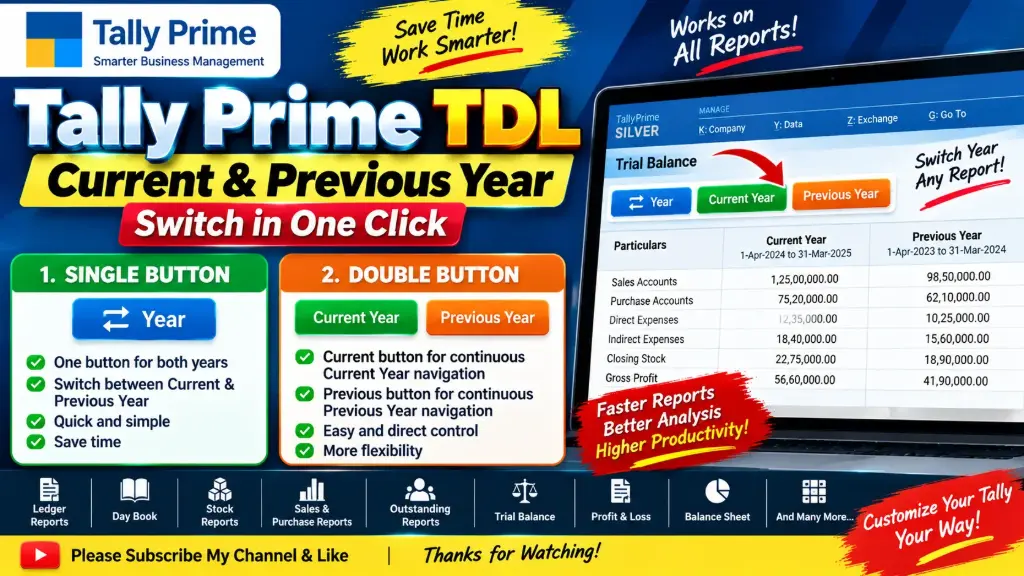
1️⃣ SINGLE BUTTON — Current ↔ Previous Year
A single button allows you to switch between the .
• One button for both years
• Click to switch between Current & Previous Year
• Quick and simple year navigation
• Saves time while checking reports
• No need for repeated manual navigation
2️⃣ DOUBLE BUTTON — Current Year & Previous Year
Two separate buttons are provided:
🟢
• Click the Current button to continuously move through the
• Easy navigation within the current financial year
🔵
• Click the Previous button to continuously move through the
• Easy navigation within the previous financial year
This gives you separate and direct control over .
📊 WORKS ON ALL TALLY REPORTS
Both features are designed to work across .
✅ Ledger Reports
✅ Day Book
✅ Stock Reports
✅ Sales Reports
✅ Purchase Reports
✅ Outstanding Reports
✅ Trial Balance
✅ Profit & Loss
✅ Balance Sheet
✅ Group Reports
✅ Voucher Reports
✅ And other Tally Prime reports
⚡ FAST & EASY WORKFLOW
• One-click year switching
• Continuous Current Year navigation
• Continuous Previous Year navigation
• Reduces manual navigation
• Saves valuable accounting time
• Simple and user-friendly
• Designed for everyday Tally users
🎯 TALLY PRIME TDL CUSTOMIZATION
This solution is developed using and is designed to enhance the standard Tally Prime reporting experience.
It is especially useful when you frequently need to compare, verify or review data between different financial years.
🎯 IDEAL FOR
✔ Accountants
✔ Tally Operators
✔ Accounting Firms
✔ CA & Tax Professionals
✔ Businesses using Tally Prime
✔ Tally Developers