- How to Install the TDL File in Tally
- Step 1. Go to Gateway of Tally.
- Step 2. Then Press Ctrl+Alt+T button
- Step 3. Now Press F4 Button or Click on “Manage Local TDL” button
- Step 4. Now do “Yes” to “Load TDL Files on Startup” option
- Step 5. Now in the next line “List of TDL Files to preload on Startup” Enter the TDL File Path or Location Like “E:/File.tcp”
- Step 6. Now save the settings
- Your TDL File is ready to use.
- Tally Prime TDL
🔑 KEY FEATURES
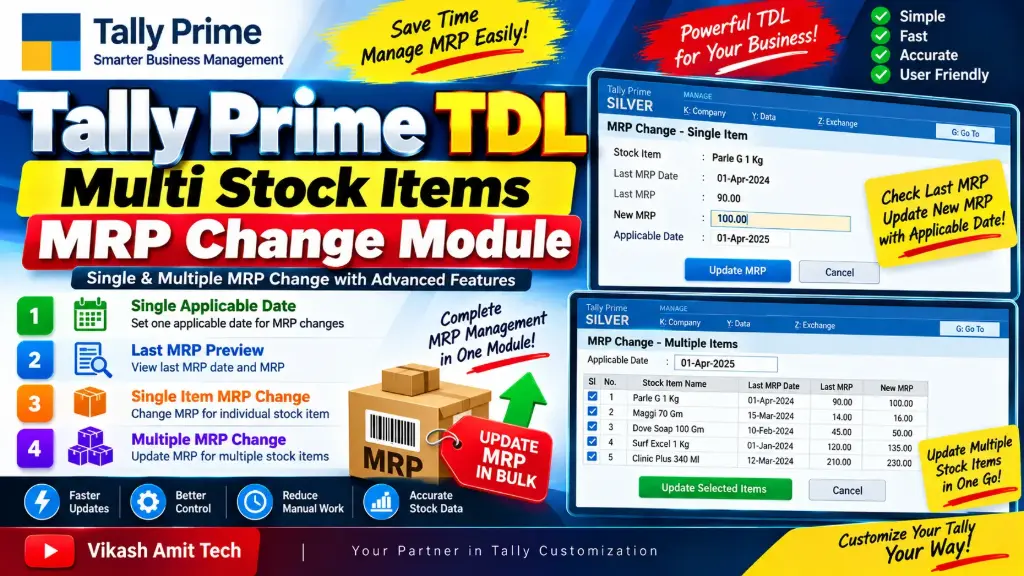
1️⃣ SINGLE APPLICABLE DATE
Set a single applicable date for MRP changes.
• Set one applicable date for MRP updates
• Easy date selection
• Use the applicable date for MRP changes
• Simplifies MRP date management
• Faster and easier MRP updating
2️⃣ LAST MRP PREVIEW — DATE & MRP
Before changing the MRP, you can preview the last MRP and its applicable date.
📅 Last MRP Date
• View the date of the previous MRP
💰 Last MRP
• View the previous MRP value
• Check previous MRP before updating
• Verify the last MRP details
• Helps maintain better MRP control
3️⃣ SINGLE ITEM MRP CHANGE
Change the MRP of a single stock item easily.
• Select a single stock item
• View the last MRP
• View the last MRP applicable date
• Enter the new MRP
• Set the applicable date
• Update MRP quickly
This feature is useful when you need to change the MRP of an individual stock item.
4️⃣ MULTIPLE MRP CHANGE
Change the MRP of multiple stock items in one process.
• Select multiple stock items
• View existing MRP details
• View previous MRP and applicable date
• Enter new MRP values
• Apply the applicable date
• Update multiple stock items together
• Saves time compared to updating each item manually
This feature is especially useful when the MRP of multiple products changes at the same time.
📊 EASY MRP MANAGEMENT
This TDL provides a simple workflow for managing MRP changes in Tally Prime.
✅ Single Applicable Date
✅ Last MRP Preview
✅ Last MRP Date Preview
✅ Single Item MRP Change
✅ Multiple Stock Items MRP Change
✅ Easy MRP Updating
✅ Faster Stock Item Management
⚡ FAST & EASY WORKFLOW
• Quick MRP updating
• Simple date management
• Previous MRP visibility
• Single item MRP change
• Multiple item MRP change
• Reduces repetitive manual work
• Simple and user-friendly interface
🎯 TALLY PRIME TDL CUSTOMIZATION
This solution is developed using Tally Definition Language (TDL) and is designed to enhance the standard Tally Prime Stock Item MRP management workflow.
It is especially useful for businesses where MRP changes need to be managed for single or multiple stock items.
🎯 IDEAL FOR
✔ FMCG Distributors
✔ Retail Businesses
✔ Wholesale Businesses
✔ Manufacturing Companies
✔ Stockists
✔ Accounting Firms
✔ Tally Operators
✔ Businesses using Tally Prime